CHDK allows you to automate your camera by running "scripts" - small and simple programs written by end-users and executed on the camera. Currently, CHDK allows you to use scripts written in Lua (file names: *.lua) and uBASIC (file names: *.bas). The file extension indicates how the script should be parsed. There are scripts for many applications like for exposure bracketing, focus bracketing, intervalometers and more available here : User Written Scripts
Running a script
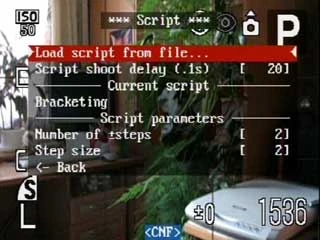

The Script Menu


Running a Script - Exposure Bracketing
Overview
- Download or write your own script and place it in the chdk/scripts/ folder of your SD-card with the proper extension (.lua for Lua scripts, .bas for UBASIC scripts).
- Enter the script menu, load the script, adjust the parameters to your liking and leave the menu.
- While still in <ALT> mode just press the shutter button and the script will start. A mini console will be displayed while you run the script.
- Note: set the Review parameter in the NORMAL camera menu to "off", other options like "x sec" or "hold" will interfere with the execution of scripts.
- You may interrupt a running script by just pressing the shutter button again. Or pause a running script by exiting <ALT> mode, if paused the script will resume right where it left off when re-entering <ALT> mode.
Running a Lua script
- The script should be saved with the filename extension .lua in the CHDK scripts folder chdk/scripts
- Lua scripts support libraries, place these files in either chdk/scripts or chdk/lualib (see Lua syntax: Libraries).
Running a uBASIC script
- The script should be saved with the filename extension .bas in the CHDK scripts folder chdk/scripts
Differences between Lua and UBASIC
uBASIC was the first scripting language supported in CHDK. Lua came later and can be found in every CHDK build released since the year 2008. In general, Lua scripts will run faster and provide more features than uBASIC but the Lua language is not as well known as the many variants of BASIC.
Useful Links
- CHDK Scripting Cross Reference Page
- Script commands - uBASIC and Lua scripting command definitions
- The script board on the [CHDK forums]
- User written scripts
Programming in uBASIC
- uBASIC Syntax
- Scripting Tutorial, including a description of available uBASIC script commands.
- uBASIC Syntax Highlighting for BBEdit
Programming in Lua
- Lua - An introduction to Lua on CHDK
- Lua Reference - Describes additional and/or changed scripting commands for the Lua scripting language
- Lua Syntax - Basic syntax for Lua scripts
Setting up a Development Environment
For help setting up a uBASIC development environment see UBASIC/TutorialScratchpad and UBDebug
For help in setting up a Lua development environment, see Lua Development Environment.
Using these tools, scripts can be tested locally on your PC prior to being uploaded to your camera.
Other Notes
You may wish to build CHDK without some components to increase the available memory on the camera.
Tip for Those Who Can't Stop a Script from Automatically Running Every Time They Turn on CHDK
If you cant 'stop' a script from running or 'unload' it, you can connect your memory card to your computer and rename script that is auto running (example: from interv.lua to interv1.lua)
If this doesn't work, you can also stop the script, then press the <alt> button, then go to the "scripts" menu, and change "Autostart" to "off".