The Canon IXUS 100IS (Europe) / PowerShot SD780IS (North America) / IXY DIGITAL 210IS (Japan) is the successor of the PowerShot SD770.

|
CHDK is available for the IXUS100-SD780 with firmware 1.00B or 1.00C in beta state from the download page |
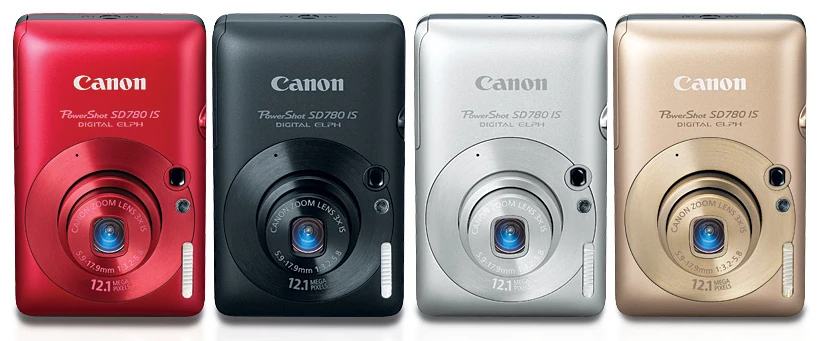

Powershot SD780 IS All Color Options
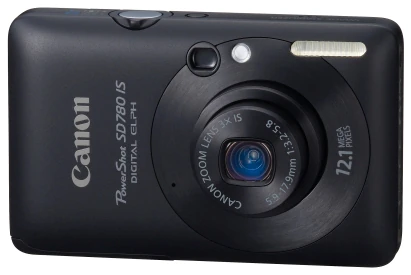

Powershot SD780 IS Front
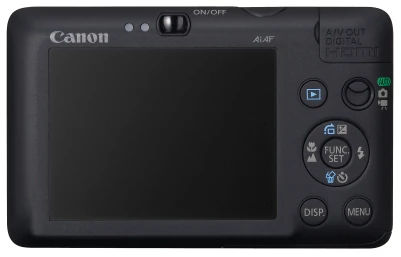

Powershot SD780 IS Back
Reviews
Technical data
→ Camera specifications: SD780IS@Canon USA
- Sensor: 12.1 million effective pixels, 1/2.3" CCD type
- DigiC IV image processor
- DryOS operating system
- Lens: 33 - 100mm (35mm equiv), 3x optical zoom, F3.2 - 5.8
- Image stabilization (lens shift type)
- Display: 2.5" TFT, 230,000 pixels
- Optical viewfinder
- Video: 1280 x 720 @ 30fps [HD], 640 x 480 @ 30fps [L], 320 x 240 @ 30fps [M]
- Video format: MOV (H.264 + Linear PCM (Monaural)), up to 4GB or 1/2 hour in [HD] or 4GB / 1 hour in [L] or [M]
- Storage: SD, SDHC, MMC, MMCplus, HC MMCplus
- Battery: Canon Li-ion Battery NB-4L
- Dimensions: 87 x 56 x 18 mm, Weight: 115g without battery
- Speed: Approx 0.8 fps continuous shooting
- Special features: HDMI connector, accelerometer
Version information
Note that there must be at least one photo stored on your SD card for firmware display to work correctly.
Created ver.req (responds to either ver.req or vers.req), go into playback mode, then pressed FUNCSET and DOWN simultaneously:
Version 1.00c
Canon PowerShot SD780 IS
P-ID:31C2 NT D

Firmware Ver GM1.00C
NoError
Jan 13 2009 08:18:45
or
Canon DIGITAL IXUS 100 IS
P-ID:31C2 PAL D

Firmware Ver GM1.00C
NoError
Jan 13 2009 08:18:45
Pressing DOWN once again with FUNCSET still pressed:
Adj Ver.004.008
Pressing DOWN a third again with FUNCSET still pressed:
- when using ver.req:
IS Firm Ver. 2.06
IS Param Ver. 2.06
- when using vers.req:
Total Shoot: 161
Zoom Retry Count: 0
Mecha Condition: 0x00000000
Pressing DOWN a last time with FUNCSET still pressed:
Driver Info: 0x00000000
Version 1.00b
 Canon PowerShot SD780 IS
 P-ID:31C2 NT D

 Firmware Ver GM1.00B
 NoError
 Dec 19 2008 14:24:25
 Adj Ver.004.008

 IS Firm Ver. 2.06
 IS Param Ver. 2.06

 Driver Info: 0x00000000
CHDK specialities
Due to the camera's keyboard layout, CHDK for the SD780 uses the following key to enter <ALT> mode :
- Press Playback (the blue triangle in a blue box) key shortly for enter/exit <ALT mode>, press Playback key longer for the camera's original function
- Alternatively, the <ALT> key can be set from the CHDK menu to be the DISP key
Note: Setting the <ALT> key to the DISP key results in odd and unpredictable behaviour when attempting to connect to the camera using CHDKPTP. For stable operation, set the Playback key for <ALT> mode via the CHDK menu before attempting to connect to CHDKPTP.
For Developers
Firmware dumps
Progress:
- Camera responds to encoded DISKBOOT.BIN on bootable FAT16, but UDumper (NewDryOS) from CartTricks 1.44 does not write on card.
- Camera will boot PS.FI2 file. Have discovered first LED.
- AF LED found. Blinker circuit built; initial tests look good for first attempts at blinker firmware dump.
- FW dump complete - will find home for it shortly.
- Initial port underway.
Dumps:
- Firmware 100C (8M full fump, by HarpoMa): direct DL link
- Firmware 100B (8M full dump, by bakulev)
LED addresses
0xC0220124  Right Side Indicator Light (green)
0xC0220128  Right Side Indicator Light (orange=0x46)
0xC022012C  Left Side Indicator Light (yellow)
0xC0223030  Auto-focus LED (very bright...)
Porting
- 13-March-2010: the Ixus 100 / SD780 1.00C port is now in the official CHDK trunk, changeset #876
- The Ixus 100 / SD780 1.00C port was done by HarpoMa
- The SD780 1.00C porting thread (by HarpoMa) is here: forum link